Feature tags
Introduction
Redot has a special system to tag availability of features. Each feature is represented as a string, which can refer to many of the following:
- Platform name.
- Platform architecture (64-bit or 32-bit, x86 or ARM).
- Platform type (desktop, mobile, Web).
- Supported texture compression algorithms on the platform.
- Whether a build is
debugorrelease(debugincludes the editor). - Whether the project is running from the editor or a "standalone" binary.
- Many more things.
Features can be queried at runtime from the singleton API by calling:
OS.has_feature(name)
OS.HasFeature(name);
OS feature tags are used by GDExtension to determine which libraries to load.
For example, a library for linux.debug.editor.x86_64 will be
loaded only on a debug editor build for Linux x86_64.
Default features
Here is a list of most feature tags in Redot. Keep in mind they are case-sensitive:
| Feature tag | Description |
|---|---|
| android | Running on Android (but not within a Web browser) |
| bsd | Running on *BSD (but not within a Web browser) |
| linux | Running on Linux (but not within a Web browser) |
| macos | Running on macOS (but not within a Web browser) |
| ios | Running on iOS (but not within a Web browser) |
| windows | Running on Windows |
| linuxbsd | Running on Linux or *BSD |
| debug | Running on a debug build (including the editor) |
| release | Running on a release build |
| editor | Running on an editor build |
| template | Running on a non-editor (export template) build |
| double | Running on a double-precision build |
| single | Running on a single-precision build |
| 64 | Running on a 64-bit build (any architecture) |
| 32 | Running on a 32-bit build (any architecture) |
| x86_64 | Running on a 64-bit x86 build |
| x86_32 | Running on a 32-bit x86 build |
| x86 | Running on an x86 build (any bitness) |
| arm64 | Running on a 64-bit ARM build |
| arm32 | Running on a 32-bit ARM build |
| arm | Running on an ARM build (any bitness) |
| rv64 | Running on a 64-bit RISC-V build |
| riscv | Running on a RISC-V build (any bitness) |
| ppc64 | Running on a 64-bit PowerPC build |
| ppc32 | Running on a 32-bit PowerPC build |
| ppc | Running on a PowerPC build (any bitness) |
| wasm64 | Running on a 64-bit WebAssembly build (not yet possible) |
| wasm32 | Running on a 32-bit WebAssembly build |
| wasm | Running on a WebAssembly build (any bitness) |
| mobile | Host OS is a mobile platform |
| pc | Host OS is a PC platform (desktop/laptop) |
| web | Host OS is a Web browser |
| web_android | Host OS is a Web browser running on Android |
| web_ios | Host OS is a Web browser running on iOS |
| web_linuxbsd | Host OS is a Web browser running on Linux or *BSD |
| web_macos | Host OS is a Web browser running on macOS |
| web_windows | Host OS is a Web browser running on Windows |
| etc | Textures using ETC1 compression are supported |
| etc2 | Textures using ETC2 compression are supported |
| s3tc | Textures using S3TC (DXT/BC) compression are supported |
| movie | Movie Maker mode is active |
Custom features
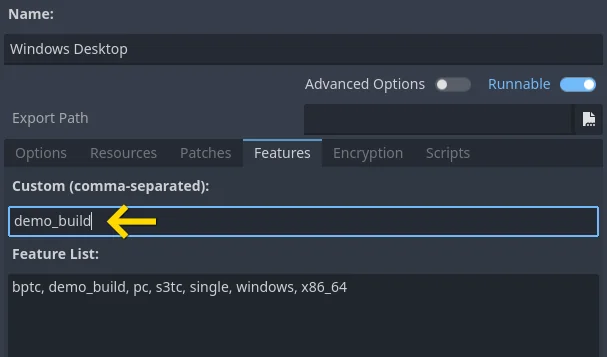
It is possible to add custom features to a build; use the relevant field in the export preset used to generate it:
Overriding project settings
Features can be used to override specific configuration values in the Project Settings. This allows you to better customize any configuration when doing a build.
In the following example, a different icon is added for the demo build of the game (which was customized in a special export preset, which, in turn, includes only demo levels).
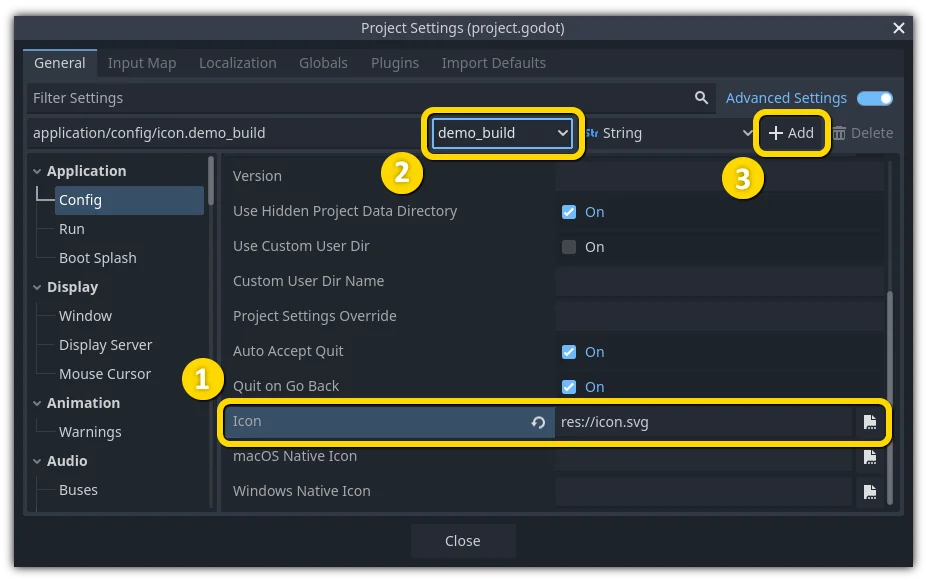
The desired configuration is selected, which effectively copies its properties to the panel above (1). The "demo_build" feature tag is selected (2). The configuration is added to the project settings (3).
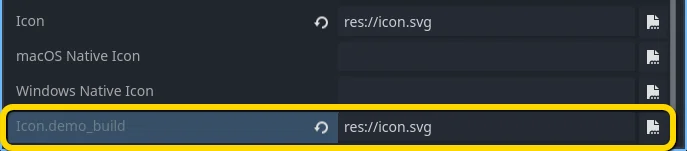
After overriding, a new field is added for this specific configuration.
Default overrides
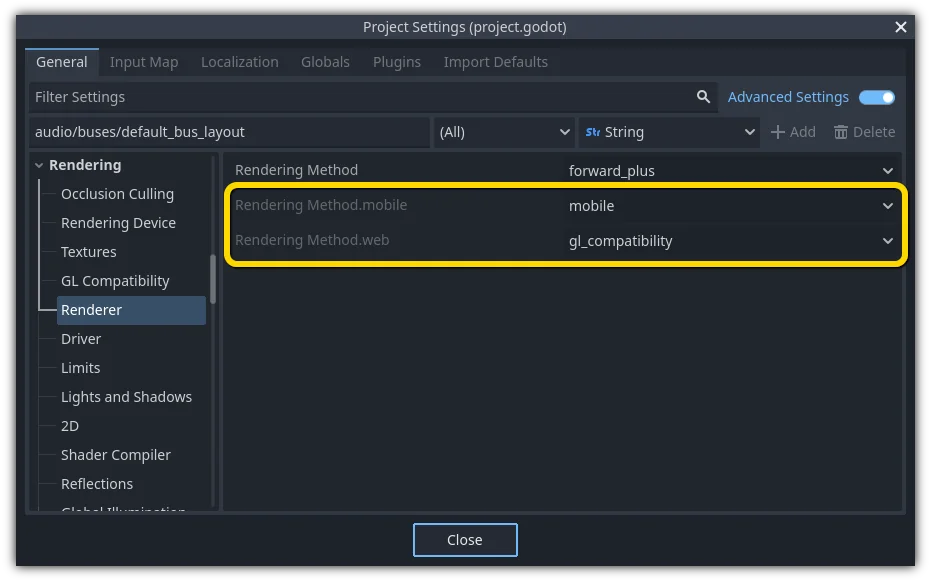
There are already a lot of settings that come with overrides by default; they can be found in many sections of the project settings.
Customizing the build
Feature tags can be used to customize a build process too, by writing a custom ExportPlugin. They are also used to specify which shared library is loaded and exported in GDExtension.