GDScript documentation comments
In GDScript, comments can be used to document your code and add descriptions to the
members of a script. There are two differences between a normal comment and a documentation
comment. Firstly, a documentation comment should start with double hash symbols
##. Secondly, it must immediately precede a script member, or for script descriptions,
be placed at the top of the script. If an exported variable is documented,
its description is used as a tooltip in the editor. This documentation can be
generated as XML files by the editor.
Documenting a script
Comments documenting a script must come before any member documentation. A suggested format for script documentation can be divided into three parts.
- A brief description of the script.
- Detailed description.
- Tutorials and deprecated/experimental marks.
To separate these from each other, the documentation comments use special tags.
The tag must be at the beginning of a line (ignoring preceding white space)
and must have the format @, followed by the keyword.
Tags
| Brief description | No tag. Lives at the very beginning of the documentation section. | |
|---|---|---|
| Description | No tag. Use one blank line to separate the description from the brief. | |
| Tutorial | @tutorial: https://example.com @tutorial(The Title Here): https://example.com |
|
| Deprecated | @deprecated @deprecated: Use [AnotherClass] instead. |
|
| Experimental | @experimental @experimental: This class is unstable. |
For example
extends Node2D
## A brief description of the class's role and functionality.
##
## The description of the script, what it can do,
## and any further detail.
##
## @tutorial:             https://example.com/tutorial_1
## @tutorial(Tutorial 2): https://example.com/tutorial_2
## @experimental
Documenting script members
Members that are applicable for documentation:
- Signal
- Enum
- Enum value
- Constant
- Variable
- Function
- Inner class
Documentation of a script member must immediately precede the member or its annotations
if it has any. The description can have more than one line but every line must start with
the double hash symbol ## to be considered as part of the documentation.
Tags
| Description | No tag. | |
|---|---|---|
| Deprecated | @deprecated @deprecated: Use [member another] instead. |
|
| Experimental | @experimental @experimental: This method is incomplete. |
For example
## The description of the variable.
## @deprecated: Use [member other_var] instead.
var my_var
Alternatively, you can use inline documentation comments
signal my_signal ## My signal.

enum MyEnum { ## My enum.
    VALUE_A = 0, ## Value A.
    VALUE_B = 1, ## Value B.
}

const MY_CONST = 1 ## My constant.

var my_var ## My variable.

func my_func(): ## My func.
    pass

class MyClass: ## My class.
    pass
The script documentation will update in the editor help window every time the script is updated. If any member variable or function name starts with an underscore, it will be treated as private. It will not appear in the documentation and will be ignored in the help window.
Complete script example
extends Node2D
## A brief description of the class's role and functionality.
##
## The description of the script, what it can do,
## and any further detail.
##
## @tutorial:             https://example.com/tutorial_1
## @tutorial(Tutorial 2): https://example.com/tutorial_2
## @experimental

## The description of a signal.
signal my_signal

## This is a description of the below enum.
enum Direction {
    ## Direction up.
    UP = 0,
    ## Direction down.
    DOWN = 1,
    ## Direction left.
    LEFT = 2,
    ## Direction right.
    RIGHT = 3,
}

## The description of a constant.
const GRAVITY = 9.8

## The description of the variable v1.
var v1

## This is a multiline description of the variable v2.[br]
## The type information below will be extracted for the documentation.
var v2: int

## If the member has any annotation, the annotation should
## immediately precede it.
@export
var v3 := some_func()

## As the following function is documented, even though its name starts with
## an underscore, it will appear in the help window.
func _fn(p1: int, p2: String) -> int:
    return 0

# The below function isn't documented and its name starts with an underscore
# so it will treated as private and will not be shown in the help window.
func _internal() -> void:
    pass

## Documenting an inner class.
##
## The same rules apply here. The documentation must
## immediately precede the class definition.
##
## @tutorial: https://example.com/tutorial
## @experimental
class Inner:

    ## Inner class variable v4.
    var v4

    ## Inner class function fn.
    func fn(): pass
@deprecated and @experimental tags
You can mark a class or any of its members as deprecated or experimental. This will add the corresponding indicator in the built-in documentation viewer. Optionally, you can provide a short message explaining why the API is not recommended. This can be especially useful for plugin and library creators.
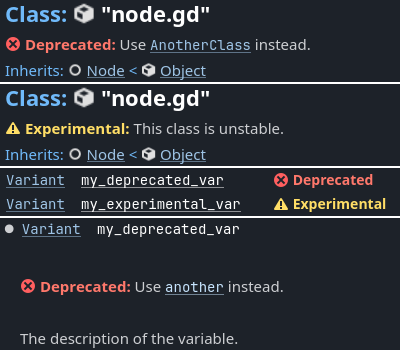
- Deprecated marks a non-recommended API that is subject to removal or incompatible change in a future major release. Usually the API is kept for backwards compatibility.
- Experimental marks a new unstable API that may be changed or removed in the current major branch. Using this API is not recommended in production code.
BBCode and class reference
Redot's class reference supports BBCode-like tags. They add nice formatting to the text which could also
be used in the documentation. See also class reference bbcode.
Note that this is slightly different from the RichTextLabel BBCode.
Whenever you link to a member of another class, you need to specify the class name. For links to the same class, the class name is optional and can be omitted.
Here's the list of available tags:
| Tag and Description | Example | Result | |||
|---|---|---|---|---|---|
[Class] Link to class |
Move the [Sprite2D]. |
Move the class Sprite2D. | |||
[annotation Class.name] Link to annotation |
See [annotation @GDScript.@rpc]. |
See @GDScript.@rpc. | |||
[constant Class.name] Link to constant |
See [constant Color.RED]. |
See Color.RED. | |||
[enum Class.name] Link to enum |
See [enum Mesh.ArrayType]. |
See Mesh.ArrayType. | |||
[member Class.name] Link to member (property) |
Get [member Node2D.scale]. |
Get Node2D.scale. | |||
[method Class.name] Link to method |
Call [method Node3D.hide]. |
Call Node3D.hide(). | |||
[constructor Class.name] Link to built-in constructor |
Use [constructor Color.Color]. |
Use Color.Color. | |||
[operator Class.name] Link to built-in operator |
Use [operator Color.operator *]. |
Use Color.operator *. | |||
[signal Class.name] Link to signal |
Emit [signal Node.renamed]. |
Emit Node.renamed. | |||
[theme_item Class.name] Link to theme item |
See [theme_item Label.font]. |
See Label.font. | |||
[param name] Parameter name (as code) |
Takes [param size] for the size. |
Takes size for the size. |
|||
[br] Line break |
Line 1.[br] Line 2. |
Line 1. Line 2. | |||
[lb] [rb] [ and ] respectively |
[lb]b[rb]text[lb]/b[rb] |
[b]text[/b] | |||
[b] [/b] Bold |
Do [b]not[/b] call this method. |
Do not call this method. | |||
[i] [/i] Italic |
Returns the [i]global[/i] position. |
Returns the global position. | |||
[u] [/u] Underline |
[u]Always[/u] use this method. <u>Always</u> use this method. |
.. raw:: html | |||
[s] [/s] Strikethrough |
[s]Outdated information.[/s] <s>Outdated information.</s> |
.. raw:: html | |||
[color] [/color] Color |
[color=red]Error![/color] <span style="color:red;">Error!</span> |
.. raw:: html | |||
[font] [/font] Font |
[font=res://mono.ttf]LICENSE[/font] <span style="font-family:monospace;">LICENSE</span> |
.. raw:: html | |||
[img] [/img] Image |
[img width=32]res://icon.svg[/img] |
.. image:: img/icon.svg :width: 32 px | |||
[url] [/url] Hyperlink |
[url]https://example.com[/url] [url=https://example.com]Website[/url] |
https://example.com Website | |||
[center] [/center] Horizontal centering |
[center]2 + 2 = 4[/center] <center>2 + 2 = 4</center> |
.. raw:: html | |||
[kbd] [/kbd] Keyboard/mouse shortcut |
Press [kbd]Ctrl + C[/kbd]. |
Press :kbd:Ctrl + C. |
|||
[code] [/code] Inline code fragment |
Returns [code]true[/code]. |
Returns true. |
|||
[codeblock] [/codeblock] Multiline code block |
See below. | See below. |
## Do something for this plugin. Before using the method
## you first have to [method initialize] [MyPlugin].[br]
## [color=yellow]Warning:[/color] Always [method clean] after use.[br]
## Usage:
## [codeblock]
## func _ready():
##     the_plugin.initialize()
##     the_plugin.do_something()
##     the_plugin.clean()
## [/codeblock]
func do_something():
    pass
By default, [codeblock] highlights GDScript syntax. You can change it using
the lang attribute. Currently supported options are:
[codeblock lang=text]disables syntax highlighting;[codeblock lang=gdscript]highlights GDScript syntax;[codeblock lang=csharp]highlights C# syntax (only in .NET version).