Exporting packs, patches, and mods
Use cases
Oftentimes one would like to add functionality to one's game after it has been deployed.
Examples of this include...
- Downloadable Content: the ability to add features and content to one's game.
- Patches: the ability to fix a bug that is present in a shipped product.
- Mods: grant other people the ability to create content for one's game.
These tools help developers to extend their development beyond the initial release.
Overview of PCK files
Redot enables this via a feature called resource packs (PCK files,
with extension .pck).
Advantages:
- incremental updates/patches
- offer DLCs
- offer mod support
- no source code disclosure needed for mods
- more modular project structure
- users don't have to replace the entire game
The first part of using them involves exporting and delivering the project to players. Then, when one wants to add functionality or content later on, they just deliver the updates via PCK files to the users.
PCK files usually contain, but are not limited to:
- scripts
- scenes
- shaders
- models
- textures
- sound effects
- music
- any other asset suitable for import into the game
The PCK files can even be an entirely different Redot project, which the original game loads in at runtime.
Generating PCK files
In order to pack all resources of a project into a PCK file open the project and go to Project/Export and click on "Export PCK/Zip". Also make sure to have an export template selected while doing so.
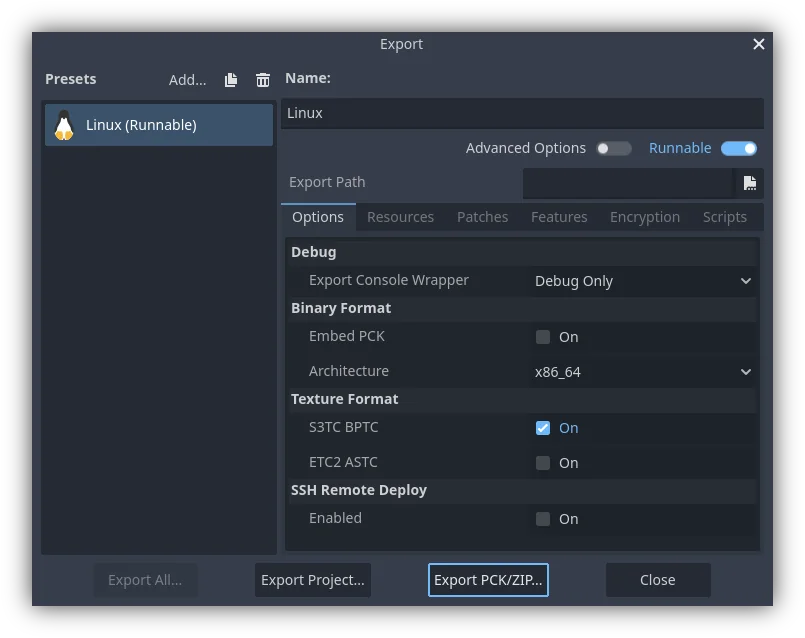
Another method would be to export from the command line. If the output file ends with a PCK or ZIP file extension, then the export process will build that type of file for the chosen platform.
Opening PCK files at runtime
To import a PCK file, one uses the ProjectSettings singleton. The following example expects a “mod.pck” file in the directory of the games executable. The PCK file contains a “mod_scene.tscn” test scene in its root.
func _your_function():
    # This could fail if, for example, mod.pck cannot be found.
    var success = ProjectSettings.load_resource_pack("res://mod.pck")

    if success:
        # Now one can use the assets as if they had them in the project from the start.
        var imported_scene = load("res://mod_scene.tscn")
private void YourFunction()
{
    // This could fail if, for example, mod.pck cannot be found.
    var success = ProjectSettings.LoadResourcePack("res://mod.pck");

    if (success)
    {
        // Now one can use the assets as if they had them in the project from the start.
        var importedScene = (PackedScene)ResourceLoader.Load("res://mod_scene.tscn");
    }
}
Summary
This tutorial explains how to add mods, patches, or DLC to a game. The most important thing is to identify how one plans to distribute future content for their game and develop a workflow that is customized for that purpose. Redot should make that process smooth regardless of which route a developer pursues.